A Five-Minute Brief for a Community Notice
A five-minute brief for a community notice helps you choose its reader, one clear action, and the details worth seeing before anything is laid out.
Who needs to act on your community notice, and what should they do after reading it? A five-minute brief for a community notice answers those questions before you open Canva, reach for a marker, or arrange type on a page. The aim is not to plan the whole design. It is to make the message clear enough that layout has a useful job to do.
Set a timer and write your answers on a scrap of paper or in a phone note. Keep the sequence below in order: reader, action, then details. This small pause can keep a notice for a library book swap from turning into a wall of equally loud information.
1. Name the reader you need to reach
“The community” is too broad to help you make choices. Name the people who are most likely to need this particular notice. That might be parents picking up children at an elementary school, tenants in one apartment building, or neighbors who use a shared garden.
Then consider where they will encounter it and what they may already know. A printed sheet beside a library entrance can assume readers know the library’s address. A notice shared in a neighborhood chat may need to identify the park or meeting room by name. These are not stylistic details; they determine which information a reader needs in order to understand the message.
Use a specific phrase rather than a demographic label. “People who want a place to donate clean children’s books” gives you a clearer audience than “families.” It points toward a useful tone, relevant details, and a place where the notice could be seen. Avoid trying to speak equally to every possible reader. You can mention access or participation information for others, but the primary reader gives the message a center.
2. Choose one action for the notice to prompt
Write the desired action as a direct verb phrase: “Bring books to the library desk,” “Register for the garden workday,” or “Attend the tenant meeting.” A notice can contain background and context, but the reader should not have to guess what to do next.
Keep the action distinct from the topic. “Community garden update” names a subject; “Join the Saturday cleanup” tells someone how to respond. If the notice seems to need several calls to action, decide which one matters most. A secondary suggestion can be included later, but giving every request equal weight may leave the reader unsure which one deserves attention.
Check that the action can be understood on its own. Does it say what to do? Does the reader know where, when, or how? “Sign up” is incomplete if the notice gives no sign-up location. “Bring a mug” is more useful when the event and its time are also clear. The action sentence is a practical test: if it feels vague, the design cannot repair the missing decision.
3. Rank the details before arranging them
Make a quick list of every fact the reader might need, then sort it by what supports the action. For a community event, likely details include the event name, date, start time, place, contact, eligibility, cost, registration method, and access information. Do not add them all automatically. Include what is relevant to this notice and remove what would distract from the reader’s next move.
Give each detail a simple rank:
- Essential: Without it, the reader cannot understand or carry out the action.
- Helpful: It answers a likely question or removes a practical obstacle.
- Optional: It adds context but does not affect the decision to act.
For a food pantry collection, the drop-off place and accepting hours may be essential, while a short note about the pantry’s purpose may be helpful. A long account of how the collection began may be optional. This ranking does not mean optional information is unimportant. It means the notice should not ask the reader to process background before finding the instructions.
Be alert to details that sound small but change what a reader can do. “Bring supplies” is not the same as naming which supplies are accepted. “All are welcome” may not answer whether a room is wheelchair accessible or whether advance registration is required. If a detail affects participation, treat it as useful or essential rather than decorative.
4. Write a compact working brief
Turn the first three decisions into a note that can sit beside the design file. Use a few plain lines:
- Reader: Who is most likely to need this notice?
- Action: What should that reader do?
- Essential details: What information makes the action possible?
- Helpful details: What removes a likely question or barrier?
- Optional detail: What can be left out if space is tight?
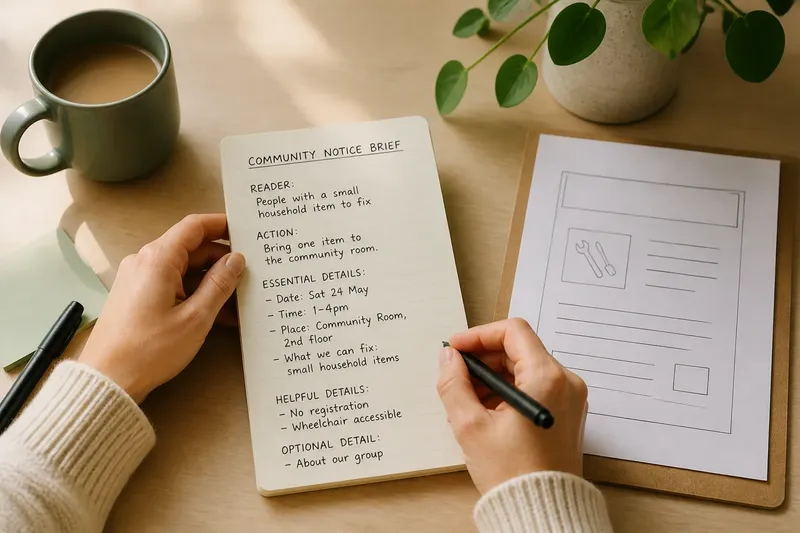
Imagine you are preparing a notice for a neighborhood tool-library repair afternoon. The intended reader is someone with a small household item to fix; the action is to bring one item to the community room. The essential details are the date, open hours, room location, and any limit on what the volunteers can accept. A note about the group’s history is optional. The resulting brief gives the layout a clear priority: make the invitation and the practical instructions easy to spot.
At this point, do not solve the design in the brief. It should not dictate a font, color palette, illustration, or column structure. Those choices depend on the medium and the material you have. The brief’s job is to preserve the message’s priorities while you make those choices.
5. Check that the message works before layout
Read the working brief as if you were the intended reader, not the organizer who already knows the event. Ask whether the action is explicit and whether the necessary details support it. If a fact is missing, seek it from the person responsible for the event instead of filling the gap with a guess.
Then try the brief as a one-sentence description: “This notice asks [reader] to [action], with [essential details] so they can do it.” If the sentence needs several competing actions, revisit the decision about the main request. If it needs a long explanation before the action makes sense, the audience or purpose may still be too broad.
Do not treat the sentence as final copy. It is a quick check that the notice has a coherent job. The finished wording may be warmer or more concise, and the design may use an image or a short headline to help readers recognize the event. The brief keeps those choices connected to the action rather than letting a clever phrase take over.
What should you decide before designing?
How much time should a notice brief take?
Keep this exercise short enough to use before an ordinary community notice, not only a major campaign. If you cannot settle the reader, action, and essential details in a few minutes, note the unanswered questions and ask the organizer who can resolve them.
Can one notice include more than one action?
It can, but give one request clear priority. If readers must both register and bring materials, make the relationship between those actions plain so neither looks like an unrelated demand.
What if the event details are not confirmed?
Mark the missing facts in the brief and leave them out of the final notice until confirmed. A polished layout cannot make an uncertain date or location dependable.
Should the brief include a visual style?
Not at this stage. First establish what the reader must understand and do; then choose type, color, imagery, and format to support that message and suit its setting.
Use the brief as a filter while you design
Keep the note visible while drafting. When a headline, illustration, or extra sentence competes for space, compare it with the intended reader and action. If it helps someone recognize the notice or carry out the request, it may belong. If it merely repeats a point or introduces another topic, set it aside.
Before sharing or printing, check that the essential details survived the design process and remain easy to find. Confirm names, dates, locations, contact information, and any participation conditions with the organizer. A five-minute brief for a community notice cannot replace those checks, but it can make clear which details matter and why.
Once the notice is out in the world, keep the brief with the editable file. If the event changes, you can tell which information needs updating and which choices were tied to the original audience or action. That makes the next revision less like starting over and more like a focused edit.